Monday, September 21, 2015

Twitter!

Many critics believe the 140 character limit dampens any possibility of Twitter being used for an educational function.  I however, disagree.

Though it's only 140 characters, for the most part, that's all you need!

For example,

Twitter is a great place to post a running news feed of the class including updates during field trips, articles relevant to the current topic or previous topics discussed in class. 

Twitter can also be used to coordinate assignments.  Rather than students being bombarded with 20 emails a day from friends, teachers, colleagues, and school faculty members, students can use Twitter to collaborate on projects or quickly let someone know about any changes.

Twitter can also be used to facilitate games.  For example, students could "live tweet" as if they were a real person relevant to the current study.  Other students can then try to guess who this particular student is portraying via @replies. 

Twitter can also be used to connect classrooms.  Teachers and students from around the county, state, or even across oceans can collaborate on assignments and keep up to date on current issues.

Twitter can be great to post sample questions from the upcoming test/quiz, or it could even be used as a facilitation device for a "Question of the Day," etc. activity.

Personally, Twitter will be used in my classroom on a "Need to Know" basis.  By that, I mean syllabus changes, upcoming due dates, test and quiz dates, important materials needed for class, or even supplemental materials including the weather forecast or just a quote or joke of the day.

In short, though there is a limit to how many characters you can use in a tweet, sometimes less is better.  If there is a thought you desperately want to share on Twitter that cannot be shortened to 140 characters or less, one can always @reply to themselves.  By doing so, their tweets will show up chronologically with a line connecting the two tweets.  This allows for parents, students, or educators, to read it as if it was one long tweet.

Once I have become more familiar with the teaching aspect of my clasroom, and I settle in to the course and my lesson plan, I will explore the option of connecting classrooms whether that be on a school wide scale or a nation/country-wide scale.  No matter how Twitter is used, it can be a very functional tool for any classroom with open access to technology.

Padlet.com

What is Padlet?

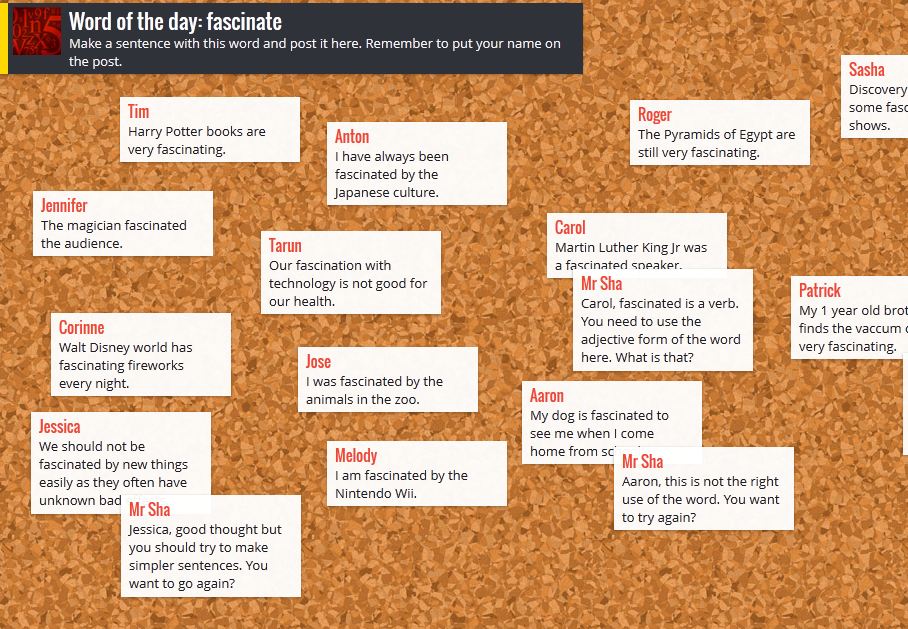
Cómo se utilza Padlet?Padlet is a free website that allows a person to create a wall where other people can create posts onto the wall. The website has a premium option which allows the owner of the walls to censor and have more control of who posts on the walls. These posts can range from just a sentence about a topic, to videos that someone found pertaining to a topic. It has many customization options and the teacher can easily create one and send the link to their students.

How can Padlet be used in the classroom?

Padlet is a great way for teachers to get student involvement and engagement when you are going over a lesson. The teacher can see how many students actually posted on the wall so that you can see if there was anyone that didn't post. A teacher could use Padlet to gauge the background knowledge of the students. They could also use it as a springboard for discussion in class. For me personally I would use this as homework, I would have students do reading and then do a quick response to it on the Padlet.

Final thoughts 

I think Padlet is a great resource for teachers who want to get every student involved in a discussion. It is especially beneficial when a teacher has many students who do not get involved during the class time. I really like the functionality of putting videos and links into the posts rather than just words. I will likely use this in my classroom in the future.

"You Weebly, we all Weebly!"

 As teachers, we need to stay organized (or at least look like it), but how do we do accomplish this? In a perfect world, we'd like to keep all of our 'stuff' in one place, which would be convenient in case we need to retrieve something it will always be there (hopefully). So what can I use to please this OCD gotta wanna needa get organized urge? Try Weebly!

So what is Weebly?
Weebly is a website or app that is used to make a personal website for yourself. Weebly's are user friendly and don't take long at all to make. The best part about it is its FREE. The free version is good for beginners, but payable versions are available that give more options.

What can I use Weebly for?
Weebly can be used for multiple things. For one, its a website that you personally made, therefore you can put pretty much anything you want to on it. A Weebly can be your class website that they use on a daily basis. You can put assignments on the website for students to complete, and you can also put your lessons on the website as well. I'll included a link to two weebly's I made in the past that I could potential use in my future biology class.

Intro to cellular biology:
http://voglerbio.weebly.com/

Women in STEM:
http://womennstem.weebly.com/


Final thoughts on Weebly....
I personally love Weebly. I will definitely use Weebly in my classroom in the future, unless my school requires us to use another website to post assignments on. This teacher tech tool separates itself from the others because it's a place where you can put all of your information so you and your students can access it anytime/anywhere. Worksheets, PowerPoint, study guides can all go on this website. It's free so go sign up and mess around with it! Check it out!

-Ben Vogler

Podcasts

Traditionally, a podcast is a recording of a person talking on some subject.  If you go and find one on something like you tube or iTunes, you'd find that many are more casual conversations about a topic, ranging from important things like science, religion, politics, and history to things like video games, the best fishing lures or a presenters favorite sandwich.  So, we can say that they are a varied tool that fit many different subjects.

When it comes to a traditional podcast, it's usually a one or more person conversation with little to no scripting, just a flow of consciousness about a topic.  In a class room situation you will need to keep the topics more focused and narrow onto a specific science topic.  For example, let’s say we are using plant stages.  It wouldn't be a hard task to divide students into small groups for such an activity.  It also would not be a bad idea to ask for either a script or a bullet list of points the students want to talk about as important.  I would even suggest that the students find and use pictures to go along with what they are talking about, even though a podcast is usually just an audio recording.
Using this in class is rather easy, as many schools, if not the vast majority either have some access to laptops or ipads or some device with the necessary software.  That software being the free movie maker software you can get with any apple or PC.  Most all of them also have some kind of microphone, and if not a microphone can be bought for very cheaply and still deliver decent sound quality.  Much of the software is designed to be very user friendly and there are countless written instructions as well videos. 
Overall, podcasts are useful for conveying information in a casual tone.  They have the advantage of being primarily auditory so students can do some degree of editing to keep their points concise and appropriate.  A video requires a lot more planning and time outside of class or time inside class to film, along with more technology.  A podcast is simple and easy to do, and can be easily shared with the other students to be used as a kind of study guide.

Sunday, September 20, 2015

Wordpress.com

So for my web tool, I picked this free blogging website called Wordpress.com. It is really easy to get started as all you need is a valid email address.  It is completely customizable and fairly easy to use though I would recommend it more for a high school class than a middle school one as understanding how the site works can take some getting used to.

I came across this site in one of my classes. The instructor required us to maintain a blog by posting our lesson plans, assignments, and debate arguments on there.  We then had to go on to our classmates' blogs and comment on the things they had written.  All of this was managed through our instructor's blog.  It acted as a kind of hub that we could access the other students' blogs from and post questions about assignments that could either be replied to by her or by our peers. Here is the link to my blog if you would like to see how I did mine.

https://austinsbigredblog.wordpress.com/

I found this web tool fascinating.  It kept all of our assignments organized while the customizable part gave us freedom to be creative and express ourselves.  I would implement this system in my classroom in a similar way to what my instructor did.  I would create my blog as a hub for students to access their fellow students' blogs from and as a place where I would post assignment instructions and answer any questions they had about the specific assignments.  They could post scientific videos and review them. They could review scientific articles.  They could even do their own research projects and post their various findings on their blog.  This would also give me easy access to keep track of their performance and growth in the content area. Also, the fact that their peers can share their ideas and offer advice and criticism on their peers' assignments brings a whole new level of interactivity to the class.

Things I  would need to keep an eye out for as a teacher would be cyber-bullying and inappropriate content.  As with any online resource where students can interact, there is a risk of cyber-bullying and teachers should remain constantly vigilant for this.  Also, the fact that these blogs are so customizable makes it easy for students to post very inappropriate things on there and as teachers we need to be aware of what all of our students are posting as much as possible.

Overall, this is a highly useful web tool due to how organized it can be while still encouraging creativity.  The difficulty getting used to it can be a struggle for younger students but if they are worked with  diligently, then I can foresee no problem with them using it as well.  I would still recommend this more for older students however.  The teacher must also be aware of what is happening in her students' blogs as to keep bad things from being said or from being posted.

Chem Pro App

This app is a must for your students if you are teaching chemistry. It includes lessons, flash cards, and tools to help your students grasp the tough chemistry concepts. The best part is that students can have easy access to these chemistry lessons on their phones or tablets.

Overview:


The three pictures above show the three screens of the app. The first is the lists of lessons. These are 8 to 10 minute videos teaching about a variety of topics, from beginning chemistry students to AP level students. This is a great way for students to hear another explanation of the material you taught in class and hearing the same material presented multiply ways will reach more students and help them continue  to understand the material. The second picture shows the tools that students have access to with this app. Since students are constantly on their phones they now have a periodic table, equation sheet, and calculators on a device they always have. The last picture shows a list of flash cards for your students. This is good because at some point in the semester the students need to be familiar with the element names and symbols and this is a great way to quiz themselves. The have flashcards already made for them and on their phones.

Review:
Overall the Chem Pro App is one of the best chemistry apps out there. The equation sheet, unit converter, and video lessons are thorough easy for the students to access. The only down side to this app is that the full version is 5 dollars. Regular chemistry students can probably get away with just downloading the free version but I highly recommend AP students buy the app.

https://itunes.apple.com/us/app/chem-pro-chemistry-tutor-in/id386263255?mt=8
https://play.google.com/store/apps/details?id=com.ihelpnyc.chempro&hl=en

Instagram

We all know that middle and high school students love their social media. Well, what if we used that within our classrooms?

There are so many different social media outlets, but I'm going to specifically speak about Instagram in this post.

What is it?

Instagram is a social networking platform that allows its' users to share pictures and videos. It is mainly a mobile media site, meaning that it is most easily accessed on a cell phone. A user can share their pictures or videos to other sites like, Facebook, Tumblr, Twitter and Flickr. Users can also edit their pictures using different filters and editing tools. Descriptions can be added underneath all posts. And hashtags can be used as a fun way to tag your photo. For instance, if I have a picture of a frog, I could write #frog in a comment below my picture. Then I could click that #frog and it would take me to other pictures that have the same hashtag.

How do I use it in the classroom?

I immediately think of having a classroom Instagram page. This can be where you, the teacher, post cool pictures from experiments and demos that you and your class have completed. Students and parents could follow it to see what is happening in the classroom. It keeps everyone up to date about classroom progress.


Here are some really nice examples of what you could post as an educator. We performed dissections on flowers and took pictures and posted them.

As an extra bonus, you could write some review information in the captions of your posts to remind students what you talked about during the day.


Posting your own photos is great, but you can do more with Instagram!

There are some really cool science related profiles on Instagram. These can be used as resources within your classroom. Say you're in sixth grade science class and you're studying space exploration. Well, won't you look at that, they have a NASA Instagram page (@nasa)! You could use some of these pictures as discrepant events. Or you could have students choose images and research information about them.

Other science Instagrams include:


Final Thoughts

Personally, I love Instagram. I think it could be a really fun tool to use within the classroom. It would allow students and parents to see what is happening within the classroom. And it can also teach students about real world applications of the science that they are learning. It can be tricky to use in some situations, such as, not all students have access to a smart phone or even internet at home. So I don't think you would use it as a primary tool for the classroom. But, I think students would love having a group Instagram because you are connecting their learning with real world applications. I think everyone should give Instagram a try within the classroom!